

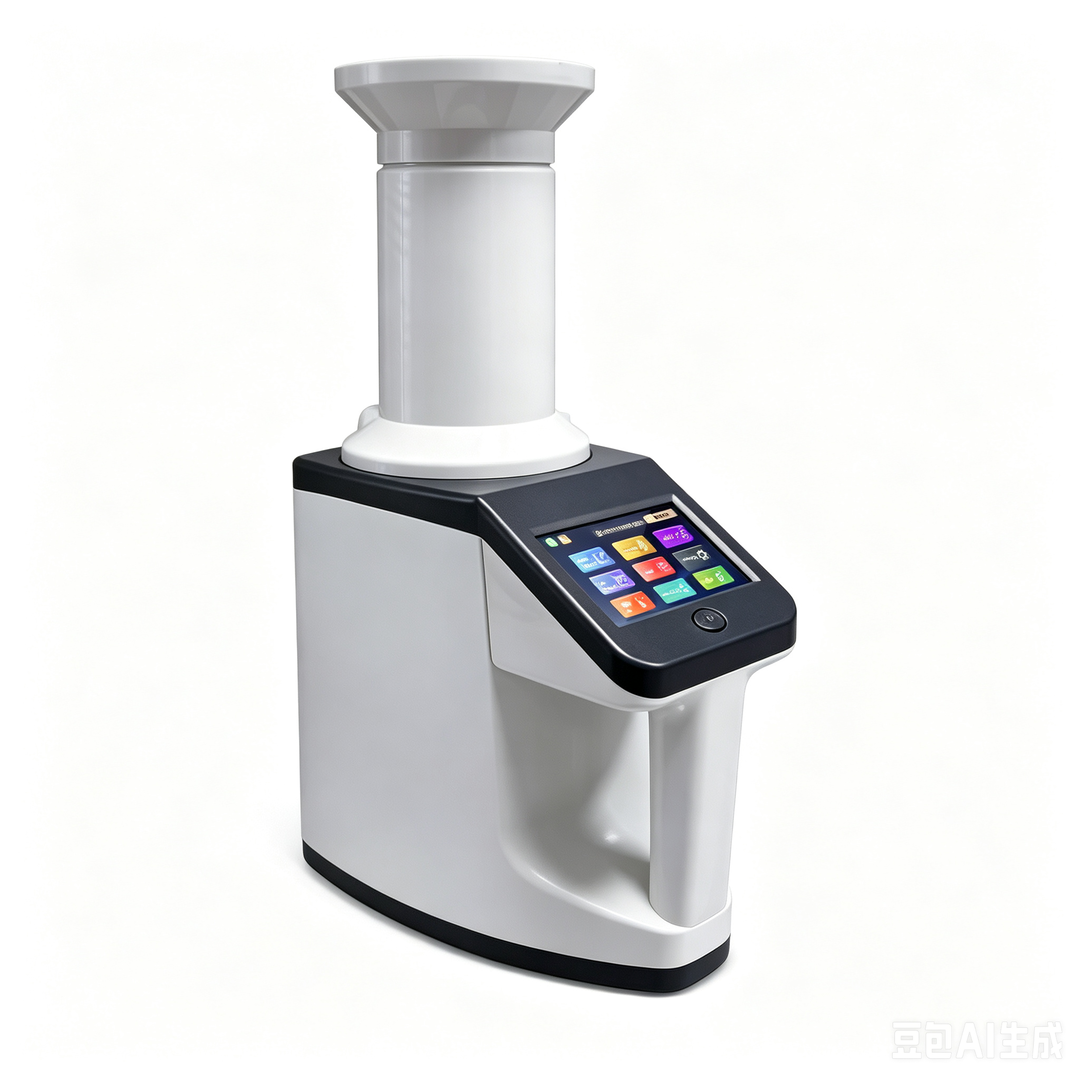

LDE-8160 Grain Moisture Tester
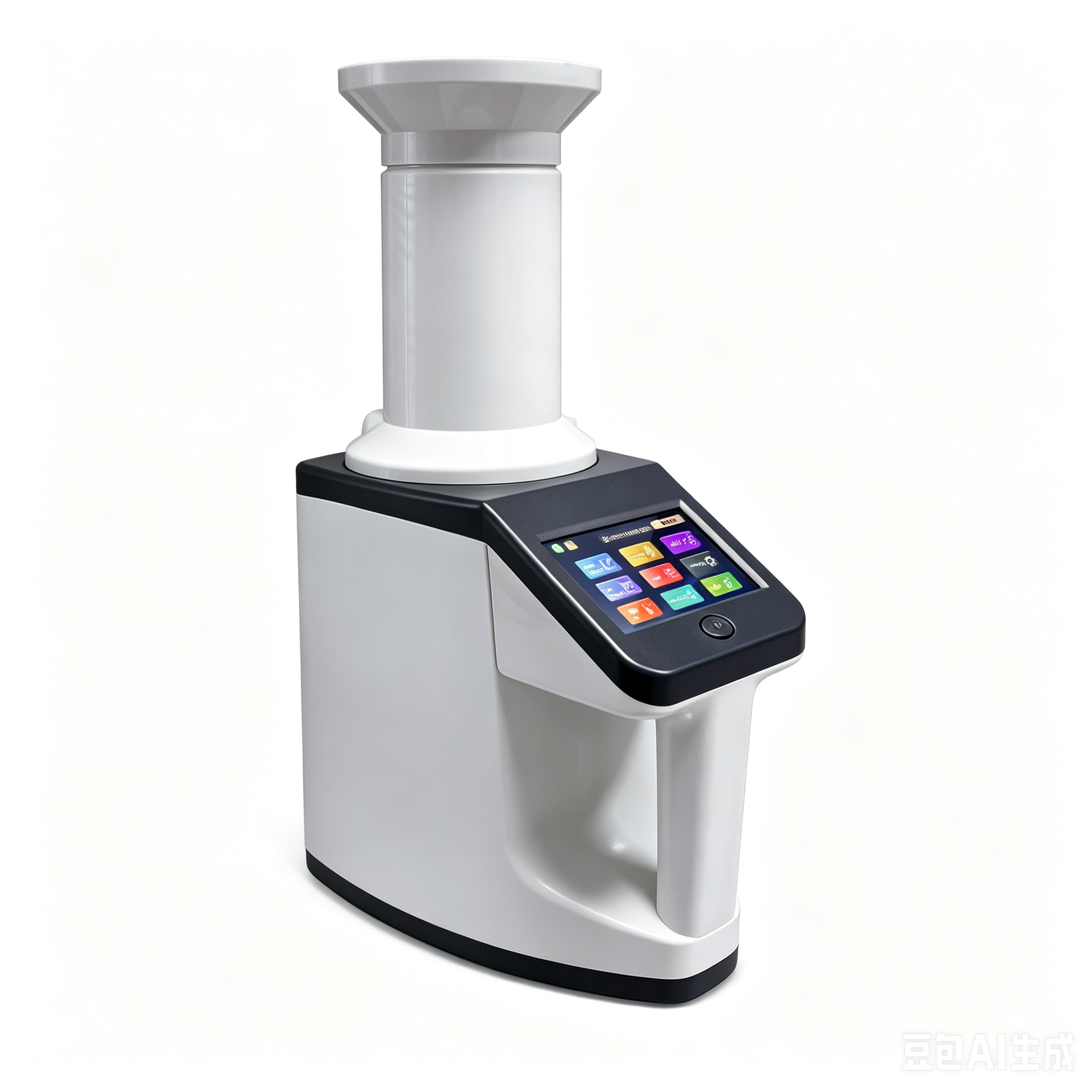
Ⅰ、 Product Overview
1. Detection principle:
measuring method Variable frequency capacitive for moisture detection of granular non-metallic grain samples such as rice, wheat, corn, soybean, rapeseed and others.
2. Basic functions:
-3.5 inch HD touch screen with automatic temperature compensation, automatic weighing, volumetric conversion, conversion of corn / soybean output rate (Reference humidity 14%);
-multi-point calibration, error correction, automatic shutdown with low energy consumption;
-Administrator encryption rights: humidity correction, data calibration, temperature calibration, system configuration requires password verification, initial password 123456;
-Dual AC DC power supply, integrated lithium battery charging model.
3. Applicable scenarios: inspection of grain procurement warehouse quality, vocational education in colleges and universities.
Ⅱ、 Whole machine structure and supporting accessories
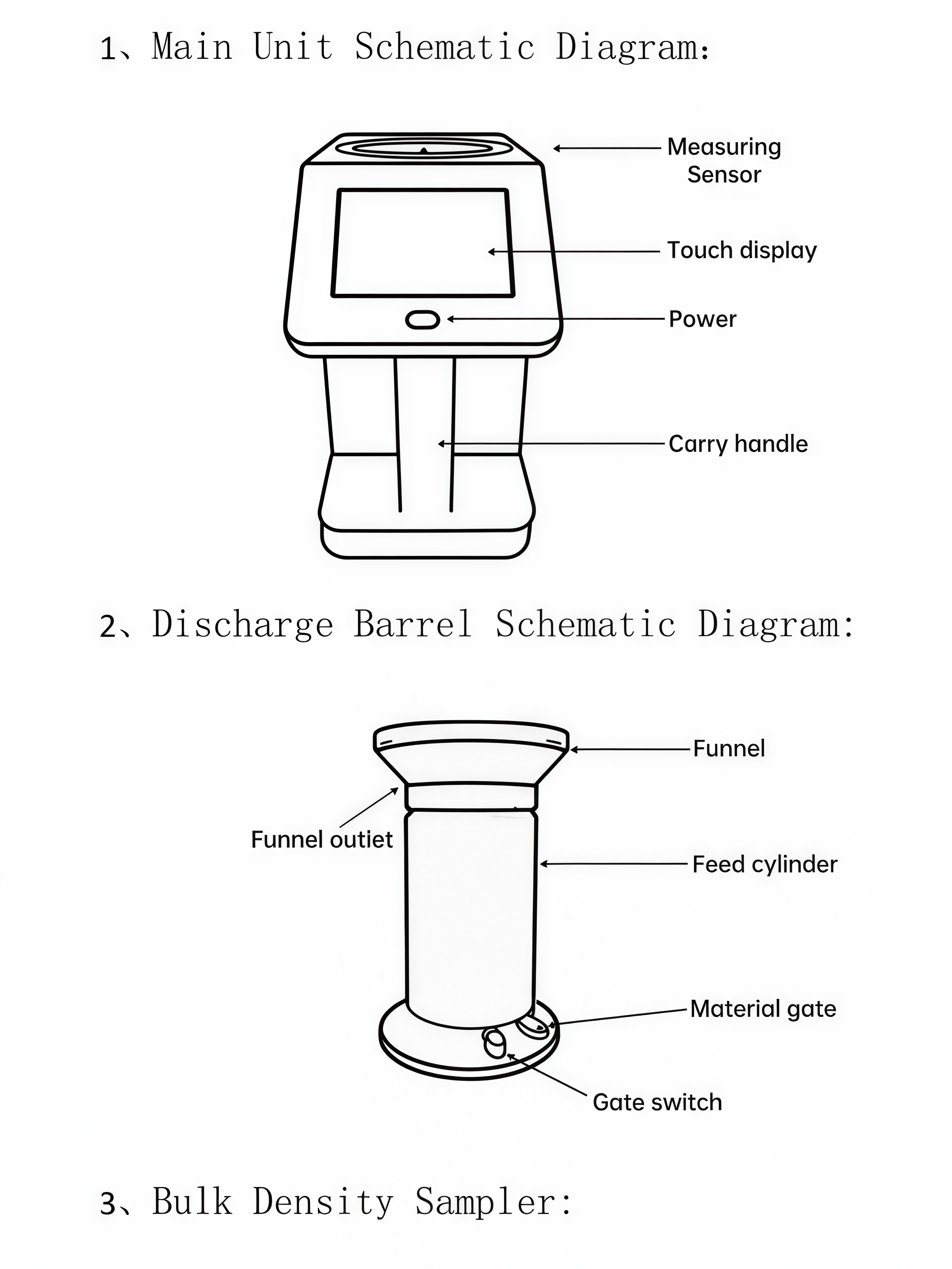
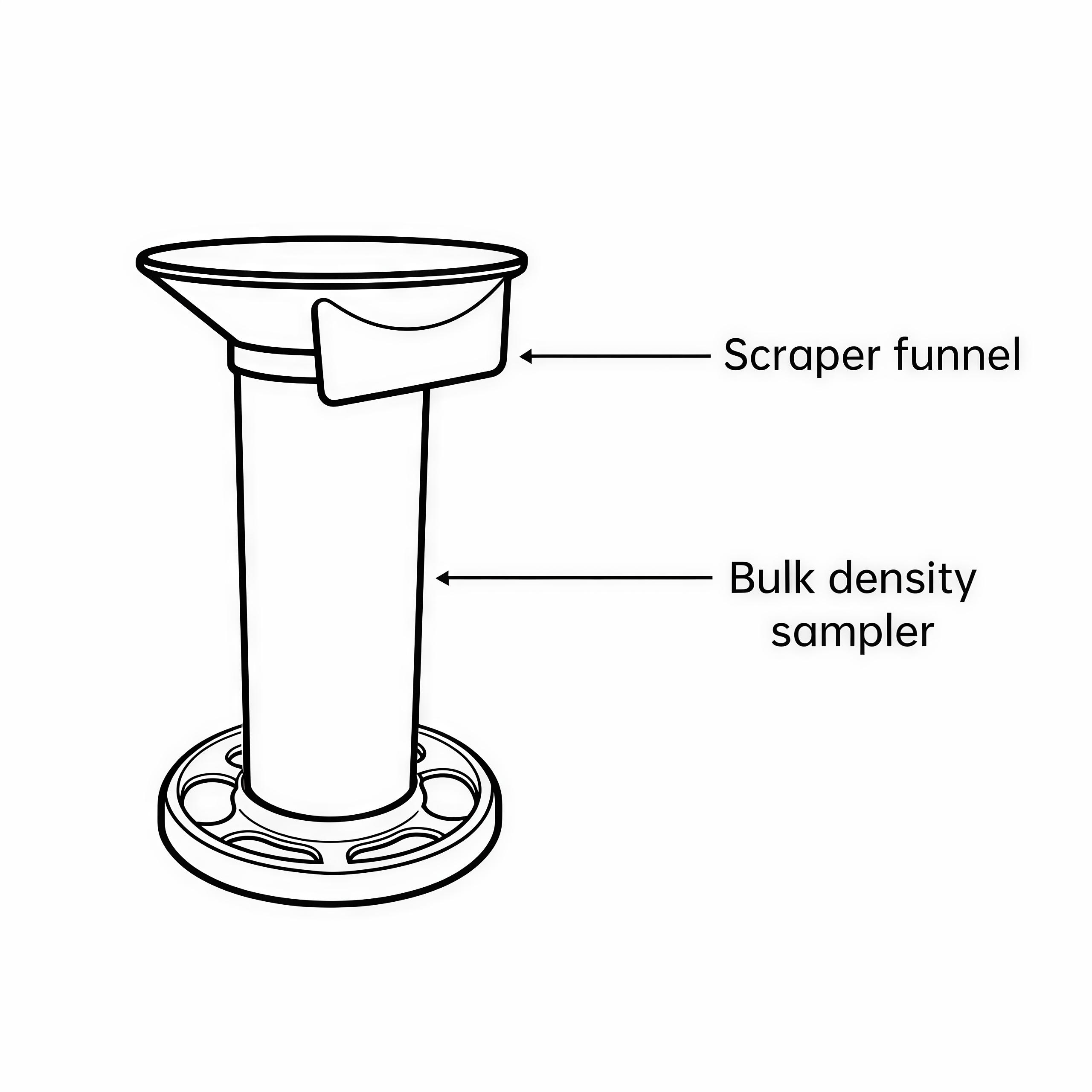
Complete list of accessories

Ⅲ、 Main technical specifications
1.Test subjects: rice, wheat, corn, soybean, rapeseed and other grain and non-metallic particle samples;
2.Working environment: 0~40℃; Duration ≤ 10 seconds for a single measurement;
3.Accuracy error: conventional humidity range error ≤ 0.5%; Calibration accuracy error ≤ 0.2%;
4.Measuring range: humidity 3%~35%;
5.Temperature treatment: automatic temperature compensation by thermistance;
6.Display: 3.5 inch HD touch screen;
7.Net weight: 830g;
8.Power Mode: 4 batteries No. 5, USB 5V DC, 3.7v lithium battery integrated in the charging model.
IV. Preparation before use
1. Equipment cleaning: Remove the bulk density sampler from the measuring cylinder and clean all debris inside the cylinder;
2. Power supply selection (choose one, strictly prohibit simultaneous use)
(1)Battery power supply: Open the battery compartment at the bottom of the instrument and install four 1.5V No. 5 batteries with positive and negative poles;
(2)USB external power supply: Connect the data cable to the instrument's external power port and matching adapter, and connect the adapter to 220V mains power;
3.Placement specification: The equipment should be placed on a windless and shockproof horizontal table, and the funnel should be assembled to the top of the discharge tube;
4.Sample pretreatment: sieve to remove grain impurities, place the sample and instrument in the same environment and let them stand until temperature equilibrium;
5.Variety pre selection: Select the corresponding grain variety in advance in the instrument before testing;
6.Calibration benchmark requirements: Instrument calibration and error correction must be based on the moisture value measured by the 105 ℃ standard oven method, otherwise the measurement accuracy cannot be guaranteed;
7.Suggestions for high-precision scenarios: For high-precision scenarios such as grain trade settlement and storage safety testing, it is recommended to use corresponding grain standard samples for multi-point calibration to ensure data accuracy.
Ⅴ.Complete operation process for moisture measurement
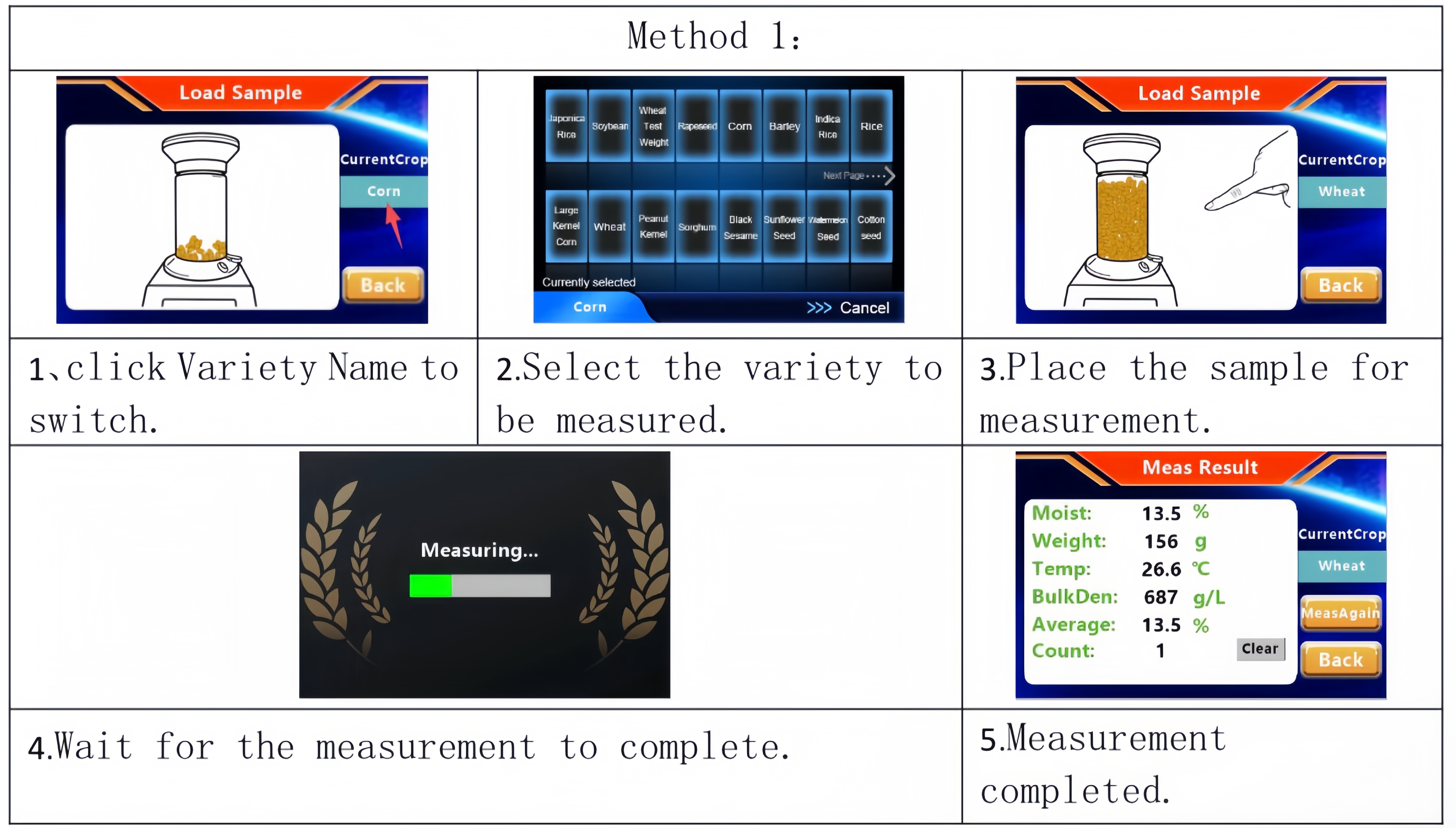
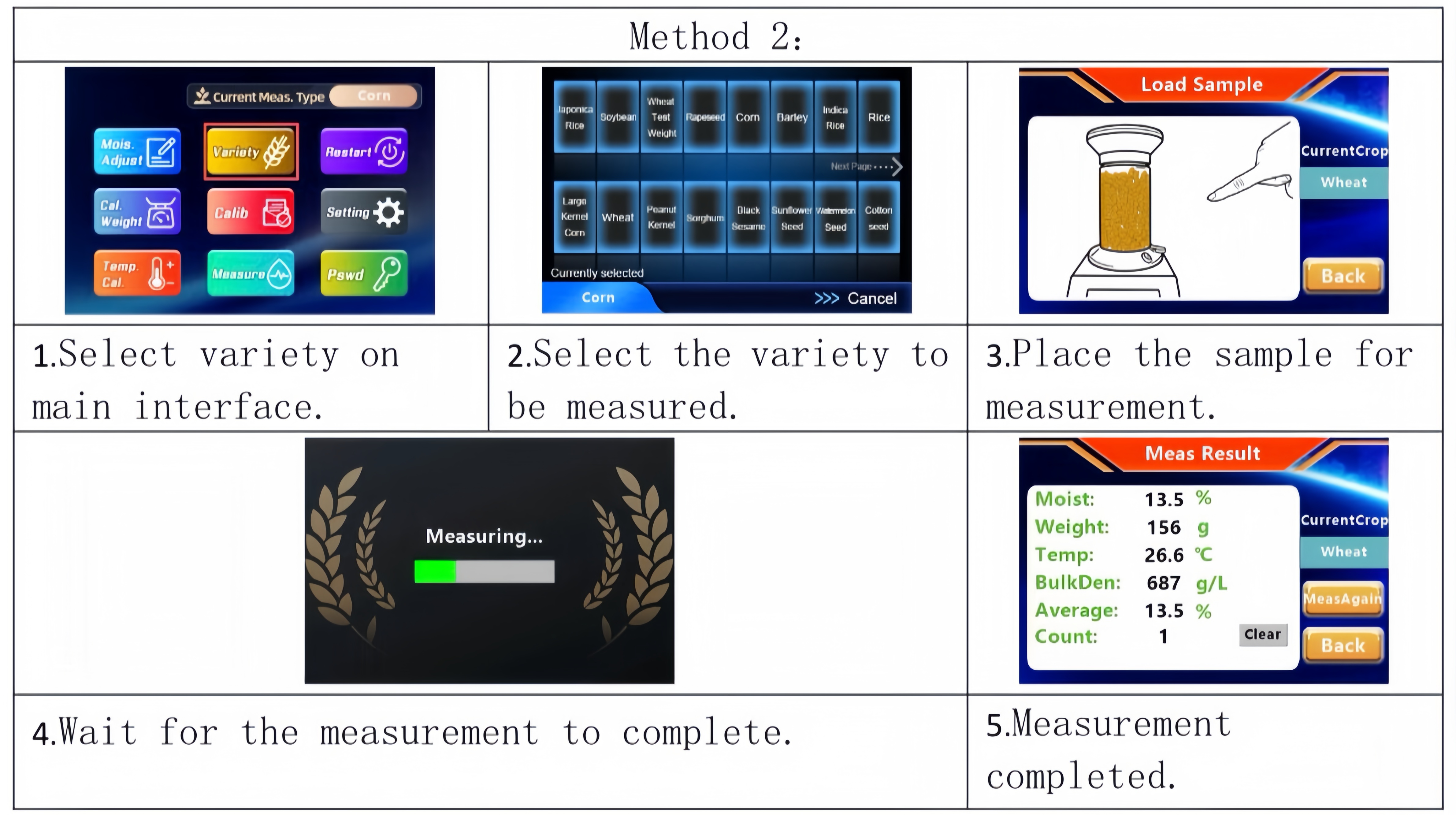
1.Startup and Grain Variety Switching (Two Optional Modes)
After turning on, the instrument automatically self checks and enters the measurement interface directly after completing the self check. By default, the last detected grain variety is used. There are two methods to switch varieties:
2.Sample installation and machine testing steps
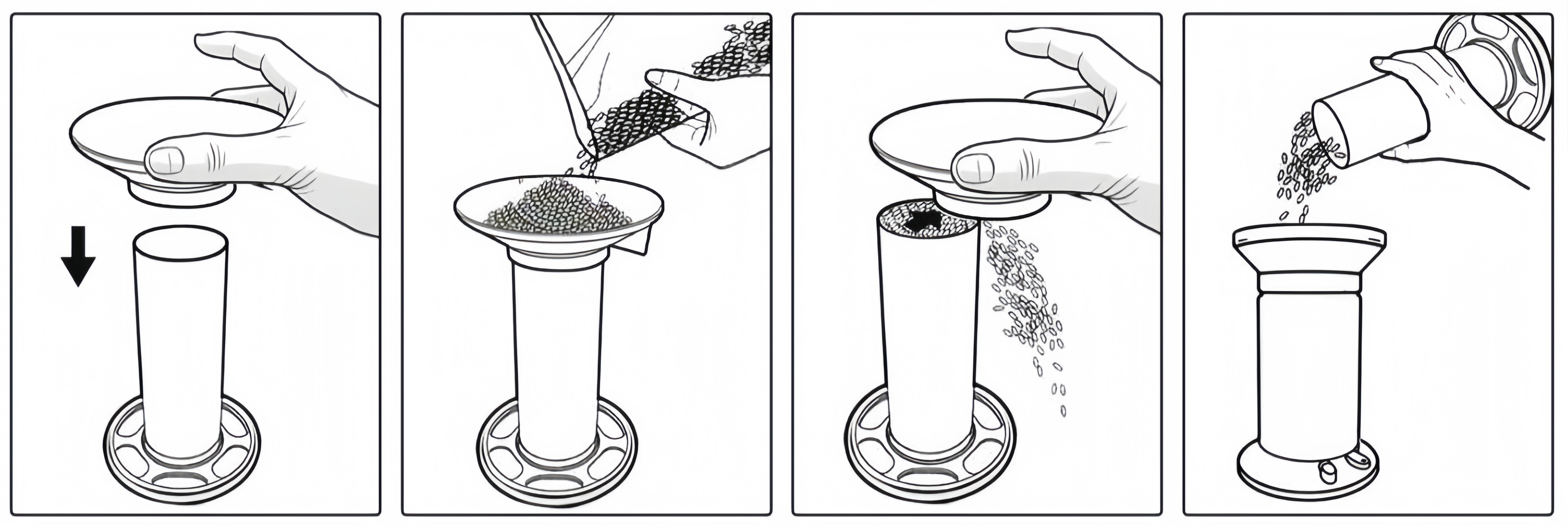
-Load the grain sample into the volumetric sampling cylinder, scratch the hole of the flat cylinder with the racket for excess material;
-Fill the feed cartridge with the grain, the loading height flushes the edge of the funnel;
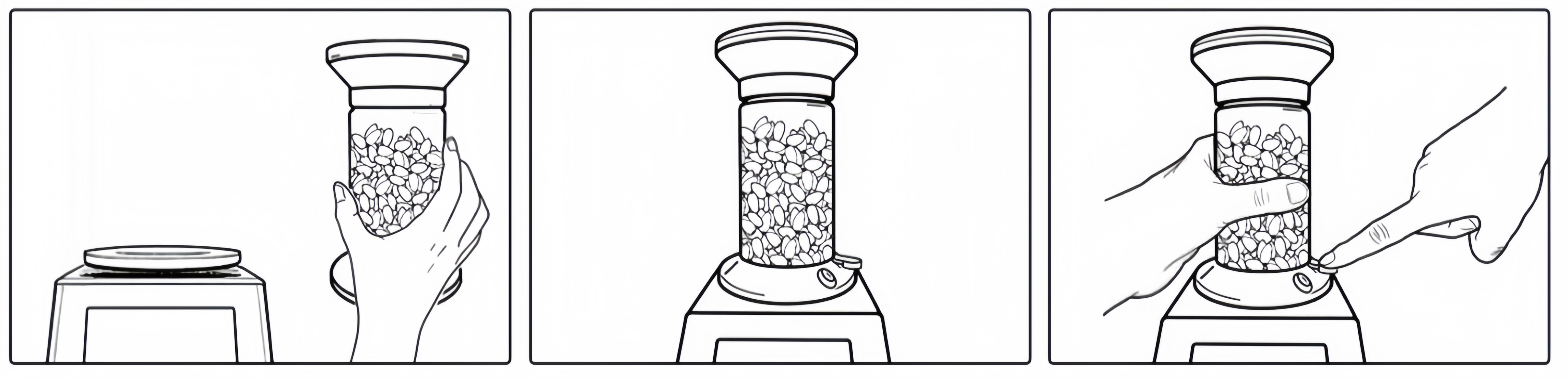
-Connect the output cylinder to the sensor port of the instrument, keep the cylinder stable, press the power door switch slightly, the grain flows evenly inside the sensor, the instrument automatically starts detection and generates results in seconds.
3.Endpoint detection and error control
1. After completing one measurement, close the discharge gate, empty the grain inside the sensor, and get ready for the next test batch.
2. To minimize measurement error, maintain consistent operating techniques throughout the whole process. For large-kernel grains such as corn, it is recommended to take multiple measurements and calculate their average value.
3. The screen simultaneously displays full data including moisture content, weight, temperature, bulk density, average value and test count.
- Multiple rounds of testing: Tap Reset to clear existing counting data before starting a new set of measurements.
- Repeat test on the same sample: There is no need to unload the grain; you may directly initiate repeated measurement.
4. Auxiliary operation for accurate bulk density measurement: Fit the leveling funnel onto the bulk density sampler, pour sample grain into the funnel to approximately one-third of its depth, scrape off excess grain to level the surface, transfer the prepared sample into the feeding cylinder, then proceed with the aforementioned measurement steps.
5. When testing corn, large-kernel corn and soybeans, the instrument will automatically calculate and display the hulling yield rate based on a reference moisture content of 14%.
Ⅵ、Moisture Adjustment
1、 Revision purpose
Due to regional and grain variety differences, the factory calibration parameters of the instrument have limitations and are prone to measurement errors. The moisture correction value can be manually set to improve detection accuracy.
2、 Three step operation process
Step 1: Calculate the correction value
Using the moisture measured by the 105 ℃ oven standard method as the reference true value correction value calculation formula: Correction value=oven standard moisture value - instrument measurement reading (the result can be positive or negative)
Example: The instrument reading is 13.6%, the oven standard value is 14.0%, and the correction value is+0.4, representing an increase of 0.4 in the instrument value; If the value is negative, the instrument reading needs to be lowered.
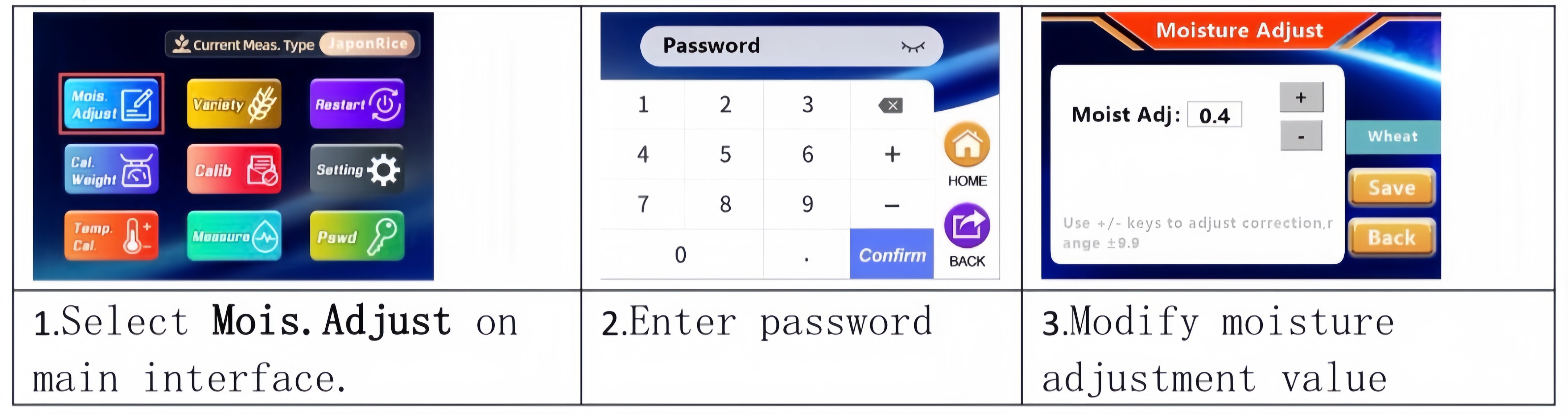
Step 2: Enter the correction settings page
(1 Empty all grain samples inside the instrument;
(2 Click the back button to return to the main interface of the instrument;
(3 Click on the "Mois. Adjust" option, enter the administrator password, and enter the settings interface.
Step 3: Set and save the correction parameters
(1 Click the ± button on the page, or directly click on the number input box to fill in the correction value calculated in the first step;
(2 Click the save button to complete the settings;
(3 After the prompt for completing the correction pops up, press the back button to exit the interface.
Ⅶ、Calibration
1、 Calibration function
Calibration is the process of reconfiguring the internal parameters of an instrument using samples with known standard moisture content, in order to add new grain variety detection curves or accurately correct measurement errors of existing varieties. This instrument supports up to 4 sets of standard samples for multi-point calibration.
2、 Preparation of calibration standard samples
-Grain standard samples with different moisture gradients must be prepared using the 105 ℃ oven standard method;
-The highest and lowest moisture content of the standard sample should cover the actual measurement range, and the difference between adjacent moisture content should be controlled within 3-6 percentage points;
-When the range span is ≤ 6 percentage points, 2-point (low, high moisture) or 3-point (low, medium, high moisture) standard samples can be selected;
Example: The wheat calibration gradient can be set as low 10%, medium 14%, medium 218%, and high 22%.
3、 Calibration hard precautions
-Calibration must be strictly carried out in the order of low moisture content, medium moisture content, and high moisture content;
-Power off is strictly prohibited throughout the calibration process, otherwise the calibration data will be invalid;
-Before calibration begins, all food materials inside the sensor must be cleared.
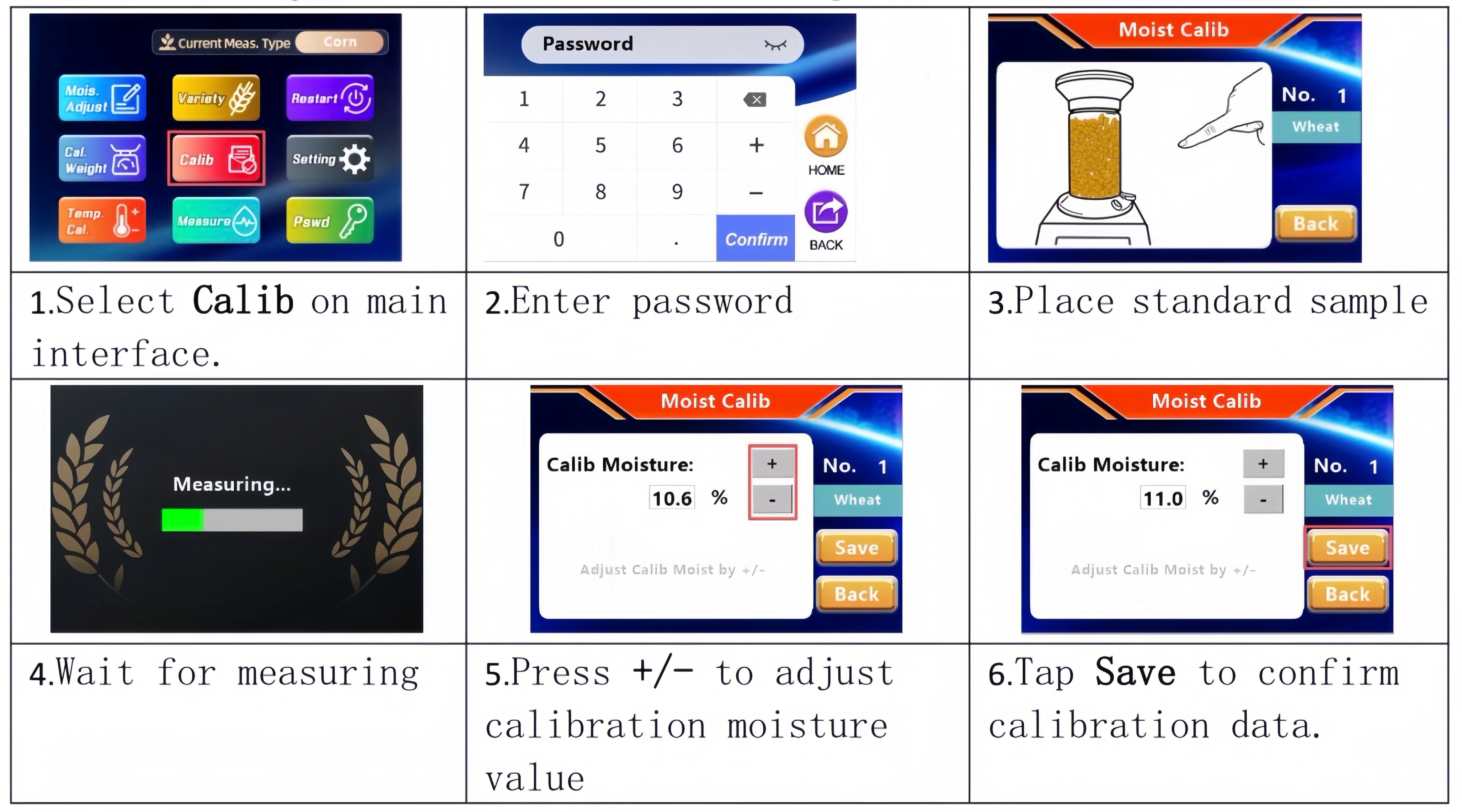
4、 Complete operation steps for single point calibration (repeat this process for multi-point calibration)
(1 Select the "Calib" function entrance on the main interface of the instrument;
(2 Enter the administrator password to enter the calibration interface;
(3 Load standard moisture samples corresponding to the gradient;
(4 Wait for the instrument to automatically complete the measurement;
(5 Use the ± button to modify the interface calibration moisture to the measured standard moisture value of the sample oven.
(6 Click Save to confirm the entry of calibration data for this group;
(7 Pour out the sample and complete single point calibration; if multi-point calibration is required, replace the next gradient standard and repeat all steps.
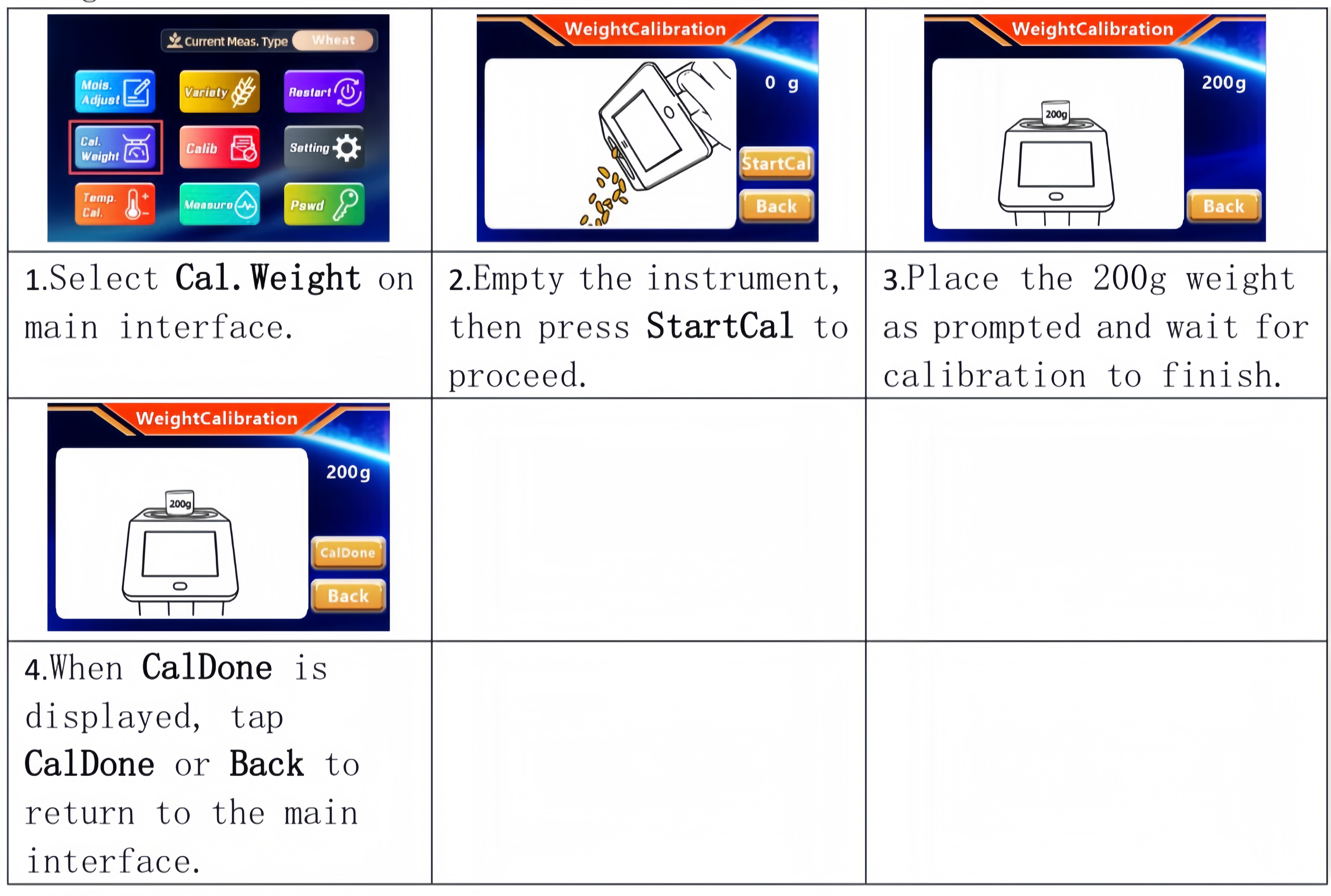
VIII、Weight Calibration
Transportation and unexpected external factors may cause drift or locking of the built-in electronic balance. It is therefore recommended to perform weight calibration prior to operation.
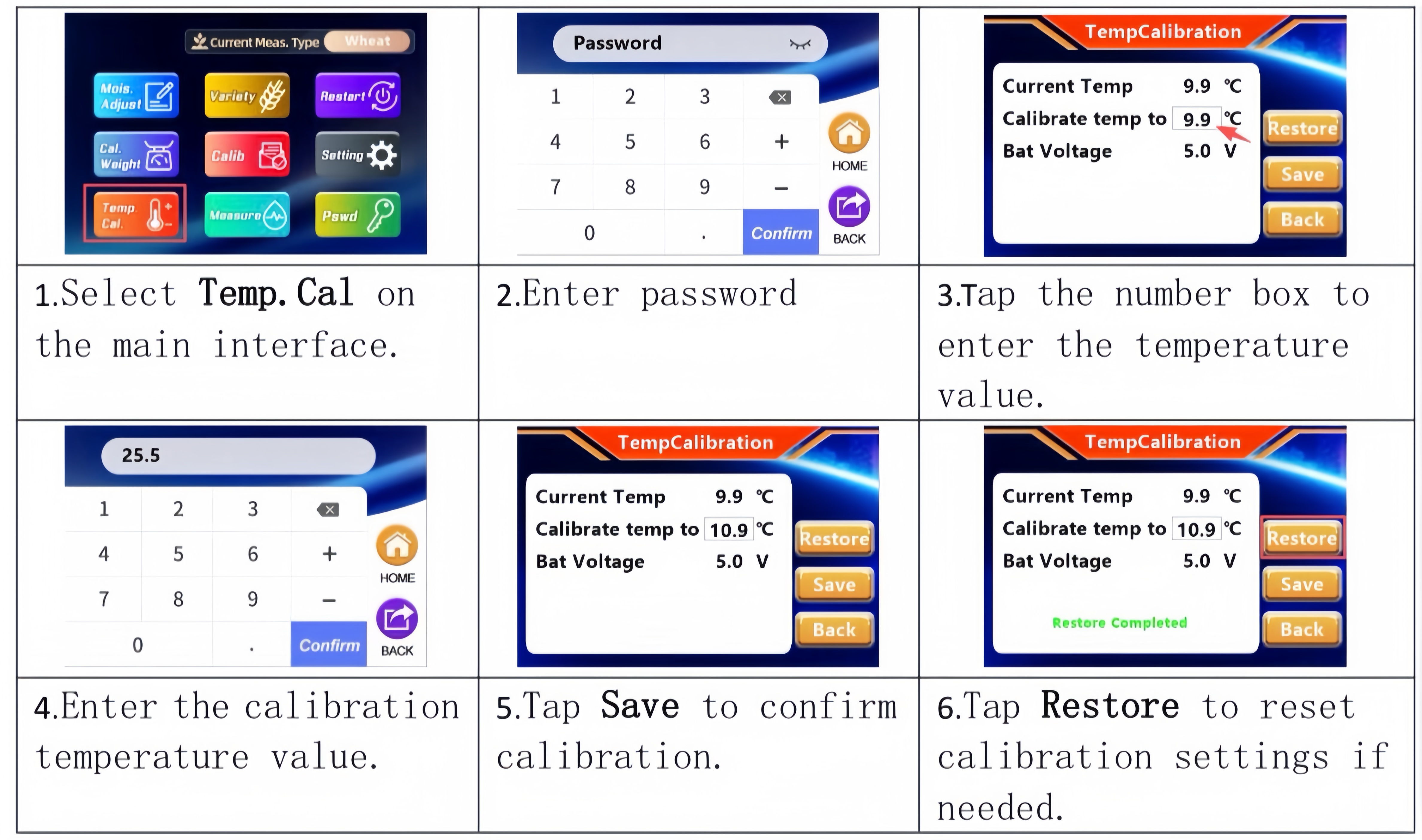
IX、Temperature Calibration
X、 Setting
Set relevant parameters of the instrument on the Settings interface.
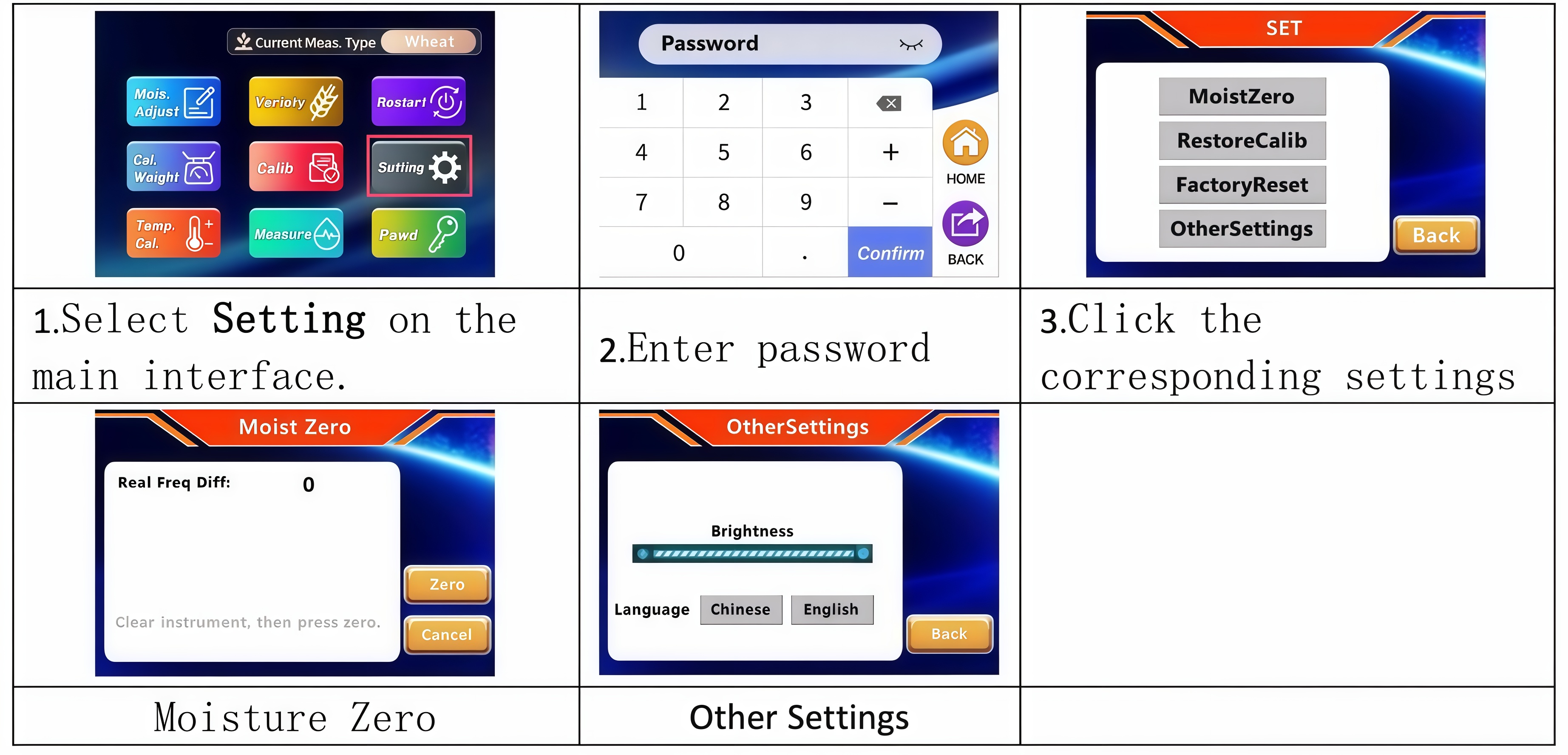
Introduction to Four Setting Functions
1. MoistZero: Used to calibrate the zero reference value of the instrument. This operation must be carried out under the guidance of professional personnel.
2. RestoreCalib: Restore the calibration parameters of all crop varieties to factory default values.
3. FactoryReset: Restore the entire instrument to its factory default state.
4. OtherSettings: Adjust screen display brightness and switch system language.
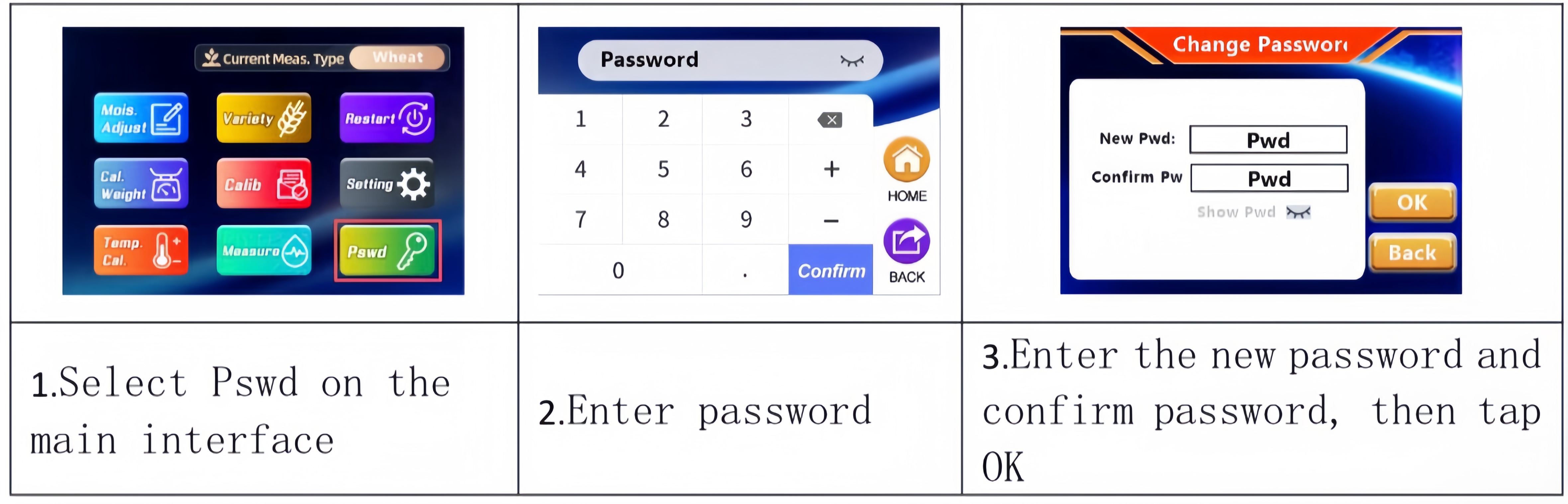
XI、 Change Password
Change administrator password.
Default administrator password: 123456
XII、Notes
1. This instrument is a precision electronic device. Handle with care, keep it away from vibration and moisture. Place it horizontally during use and storage, and perform regular cleaning and maintenance.
2. Remove the batteries if the instrument will be unused for a long time or during transportation.
3. Empty all residues inside the instrument before weight calibration, error correction and calibration.
4. Perform weight calibration before each measurement to ensure instrument precision.
5. For large-particle samples, take the average of multiple measurements when testing moisture content.
6. Do not power off the instrument during error correction and calibration, otherwise the test data will be invalid.
7. When calibrating the instrument, set the moisture values in sequence: low, medium and high.
8. Only use one power source for the instrument. Do not use batteries and AC 220V power supply simultaneously.
9. Cut off the power or remove the batteries before storage. Cover the instrument with a dustproof cover and place it horizontally in a cool and dry area.
XIII、 After-sales Service
1、Our products enjoy lifelong after-sales service.
2、Free warranty is available within one year from the date of purchase with the Warranty Card for damage or malfunction caused by product quality
issues under normal use.
3、We provide lifelong maintenance and technical support for faults caused by improper use, incorrect storage or unauthorized disassembly, as well
as products out of the one-year warranty period. Fees for repairs and spare parts will be charged as appropriate.
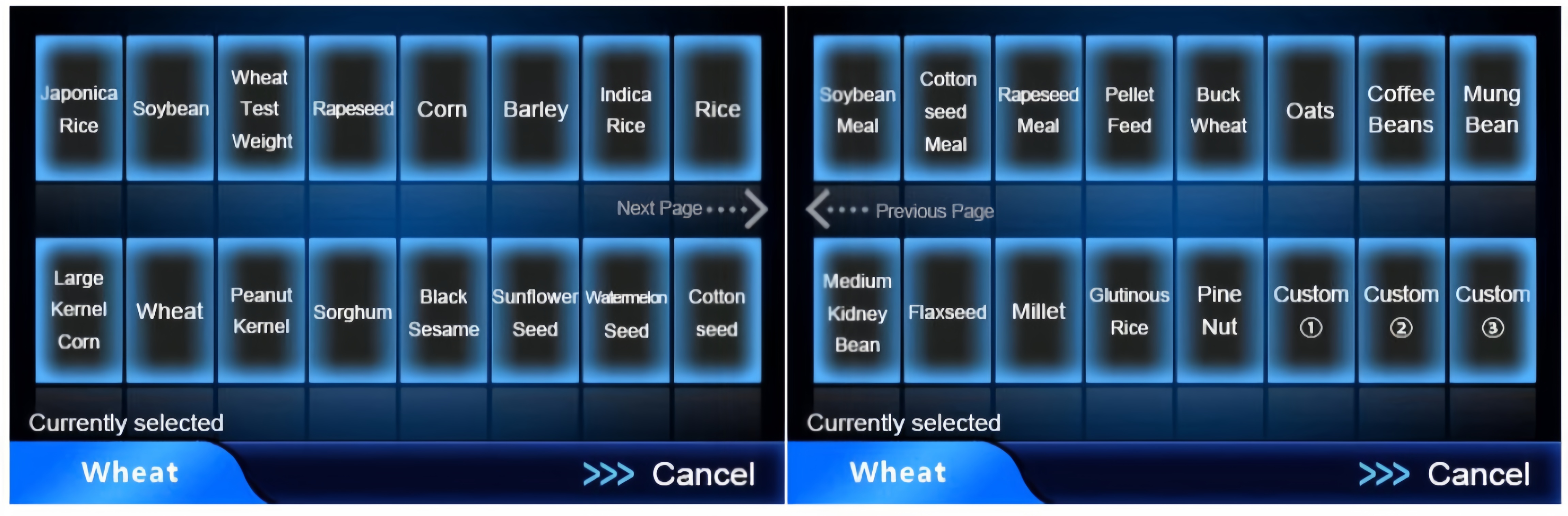
Variety List

 +86-4000-250-668


 248748436@qq.com